
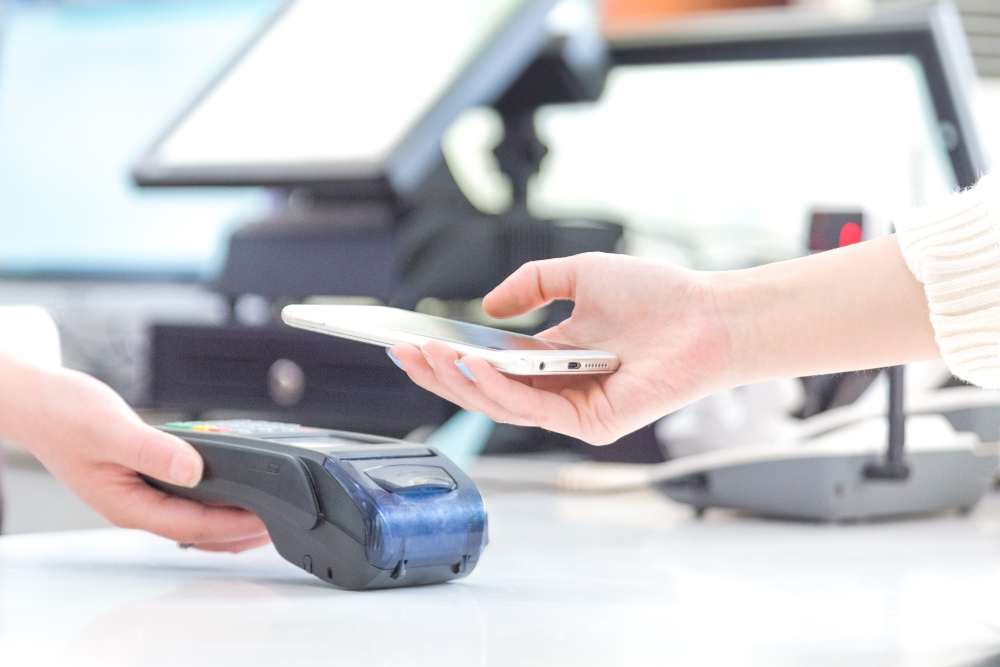
Ever wondered what is a POS system in retail business? how does it work? and why it’s such a big deal for retail businesses? Well, let’s break it down for you.
What is a POS System?
A POS system, known as a Point of Sale system, is a sophisticated technology employed in retail establishments to perform and speed up sales transactions. It serves as a pivotal platform for scanning products, calculating prices and taxes, processing payments, printing sales receipts, and updating inventory stock.
Essentially, it automates and simplifies the entire checkout process, while also offering invaluable insights into sales trends, inventory stock, and customer behavior. With its multifaceted functionalities, a POS system plays a pivotal role in optimizing operational efficiency and enhancing customer satisfaction within retail businesses.
Why it is Important for Retail Businesses?
If you’re running a small retail business or even a supermarket, understanding how POS systems work is crucial.
Let’s say you own a cozy neighborhood grocery store. With a POS system in place, your checkout process becomes a breeze.
Customers can quickly move through the line as your cashier effortlessly scans items, applies discounts, processes payments, and prints receipts for your customers.
Meanwhile, in the background, the POS system is working its magic, like:
- Updating inventory stock.
- Recording Transaction Details
- Gathering sales amounts.
- Calculates sales tax, and many more.
It’s like having a reliable assistant who takes care of all the behind-the-scenes tasks so you can focus on providing top-notch service to your customers.
Hardware and Software Components of a POS System
When it comes to setting up a Point of Sale (POS) system for your retail business, understanding the hardware and software components is crucial.
Let’s break it down.
Common types of POS hardware:
Touchscreen Terminal:
This is the central component where transactions are processed. It typically includes a display screen where items are rung up, and often integrates a customer-facing display for transparency during the transaction.
Barcode Scanner:
An essential tool for retail, the barcode scanner reads product information and prices, speeding up the checkout process significantly.
Cash Drawer:
Where cash transactions are stored securely during the transaction. It’s usually connected to the terminal and opens automatically after a sale.
Receipt Printer:
Prints out transaction details for customers. They come in various types, including thermal printers which are fast and cost-effective.
Card Reader:
To process card payments securely, you’ll need a card reader. These can range from simple swipe machines to more advanced EMV chip and contactless card readers.
Customer Display:
Often placed facing the customer, this screen shows the items being rung up, prices, and sometimes promotional messages or advertisements.
Inventory Scanner:
Used for stocktaking and managing inventory stock efficiently. It helps keep track of what’s in stock and what needs restocking.
Common POS software features:
Sales Processing:
This includes features for adding items to a transaction, applying discounts, and calculating the total amount due.
Inventory Management:
Allows you to track stock levels, manage to reorder, and receive alerts for low-stock items. This helps in preventing stockouts and overstock situations.
Reporting and Analytics:
Generate reports on sales, inventory, and other metrics. These insights aid in making informed decisions about pricing, promotions, and inventory management strategies.
Employee Management:
Features for managing staff, including clocking in and out, tracking hours worked, and setting permissions for different levels of access.
Promotions and Discount Campaign:
A few POS systems include features for creating discounts, coupons, and special offers. This feature boosts sales and attracts customers through targeted marketing.
Integration Capabilities:
Enables seamless integration with other business tools such as accounting software, e-commerce platforms, or loyalty programs.
Security Features:
Includes encryption for securing customer payment data, user permissions to restrict access to sensitive information, and regular software updates to patch vulnerabilities.
Understanding these hardware and software components is essential for selecting the right POS system that meets your business needs and enhances your operations.
POS Role in Transaction Processing:
The primary role of a POS system is transaction processing. When a customer brings items to the checkout counter, the cashier scans or manually enters each item into the POS system. The system then calculates the total amount due, including taxes or discounts, based on the prices stored in its database.
Once the customer makes a payment, whether by cash, credit card, or other means, the POS system records the transaction and updates inventory stock accordingly.
Without a POS system, handling transactions would be a tedious and error-prone process. The POS streamlines the entire checkout process, reducing wait times for customers and ensuring accurate record-keeping for the business.
How Does a POS System Work?
Let’s break down its inner workings:
Transaction Initiation:
Picture this – a customer approaches the checkout counter with their items. The cashier starts the transaction on the POS system by either scanning the items or manually inputting their codes.
Item Scanning:
Each item’s barcode is scanned, instantly pulling up its details in the system – like its name, price, and any discounts applicable.
Price Calculation:
With each item scanned, the POS system calculates the total cost, factoring in any promotions or discounts automatically. It ensures accuracy down to the last penny.
Payment Processing:
When it’s time to pay, the POS system handles various payment methods seamlessly – whether it’s cash, credit card, or mobile payments. It ensures secure transactions, safeguarding sensitive customer data.
Printing Receipts:
With the payment complete, the POS system prints out a detailed receipt for the customer. It includes a list of purchased items, their prices, any discounts applied, and the total amount paid – a neat summary for the customer to take home.
Inventory Management:
Behind the scenes, the POS system updates the inventory in real time. It deducts sold items from the available stock, ensuring accurate stock levels and preventing overselling or stockouts.
Returns Management:
In case a customer wants to return an item, the POS system makes the process smooth and hassle-free. It can process refunds, exchange items, and adjust inventory accordingly.
Cashier Shifts Management:
For businesses with multiple cashiers, the POS system tracks each cashier’s transactions separately. It helps in managing shifts, reconciling cash, and identifying discrepancies if any.
Loyalty Program and Promotions:
The POS system can also handle loyalty programs, rewarding customers for their purchases. It tracks points or rewards earned and can apply promotions or discounts based on customer loyalty.
Reporting and Analytics:
One of the most valuable features of a POS system is its ability to generate comprehensive reports and analytics. It provides insights into sales trends, popular items, peak hours, and more, empowering businesses to make informed decisions.
Integration with Other Systems:
Last but not least, a modern POS system seamlessly integrates with other business/department systems like accounting software, inventory software, purchase software, or e-commerce platforms. Depends on how big your business is. It ensures smooth data flow and streamlined operations across the board.
In essence, a POS system is the backbone of retail operations, handling everything from transactions to inventory management with precision and efficiency.
What are the Benefits of a POS System for Retail Business
Alright, let’s get to the core benefits you’ll be reaping from integrating a POS system into your retail business.
Efficiency and Accuracy Benefits:
Swift Transaction Processing:
Think of a POS system as the ultimate multitasker for your business. It’s like having an extra set of hands that never tires. Every transaction is swift and precise, cutting down waiting times at the checkout counter.
Error-Free Calculations:
With a simple scan of an item, the system instantly retrieves its price from your database and calculates the total, eliminating the chances of human error in calculation. This accuracy not only prevents monetary discrepancies but also builds trust with your customers.
Streamlined Sales Process:
Moreover, a POS system streamlines your entire sales process, from inventory management to generating reports. It keeps track of stock in real-time, ensuring you never run out of popular items or oversupply on slow movers.
This real-time insight into your inventory helps you make informed decisions, like when to reorder stock or which products to promote.
Improvement in Customer Experience: A smooth and hassle-free
Expedited Checkout Process:
In today’s fast-paced world, customers value their time more than ever. A smooth and hassle-free shopping experience can make all the difference in retaining their loyalty.
A POS system contributes significantly to this by expediting the checkout process. No more long queues or frustrated customers tapping their feet impatiently. With transactions processed swiftly, customers leave your store feeling satisfied and valued.
Provide Loyality Rewards:
Additionally, a POS system enables you to offer personalized services to your customers. Integrated loyalty programs allow you to reward frequent shoppers, encouraging repeat visits and fostering a sense of belonging.
Detailed Insights:
Furthermore, with detailed insights from POS reports, you can understand your customers’ preferences better and tailor your offerings accordingly. This personal touch goes a long way in building lasting relationships with your clientele.
So, in a nutshell, integrating a POS system into your retail business isn’t just about upgrading your technology; it’s about enhancing efficiency, accuracy, and ultimately, the overall customer experience.
By investing in the right POS system tailored to your specific needs, you’re not just staying ahead of the curve; you’re setting the stage for long-term success.
In summary, here’s what you need to know about the benefits of integrating a POS system into your retail business:
Key Takeaways
- Efficiency and Accuracy Benefits:
- Swift transaction processing reduces waiting times at checkout.
- Eliminates human errors in price calculation, ensuring accuracy.
- Streamlines sales processes, from inventory management to reporting.
- Real-time inventory tracking prevents stockouts and overstocking.
- Improvement in Customer Experience:
- Expedited checkout process enhances customer satisfaction.
- Personalized services through integrated loyalty programs.
- Detailed insights from POS reports help tailor offerings to customer preferences.
By leveraging the efficiency and accuracy benefits and improving the overall customer experience, a POS system becomes an indispensable tool for driving success in your retail business.
How Much Does a POS System Cost?
Alright, let’s talk about the money side of things when it comes to getting a POS system for your retail business. Now, the cost of a POS system can vary quite a bit depending on several factors.
Considering Business Size and Scale
First off, you’ve got to consider the size of your business and the scale of operations. A small boutique might not need as robust a system as a large supermarket chain, for example.
Hardware and Software Components
Then there are the hardware and software components. The hardware includes things like the cash register, barcode scanner, receipt printer, and possibly even tablets or touchscreen monitors. These can range from basic models to more advanced, feature-rich options. And of course, the software plays a big role too, with different providers offering various packages with varying levels of functionality.
Ongoing Costs and Subscriptions
Next up, you’ve got ongoing costs to think about. This could include subscription fees for the software, maintenance, and support costs, and any additional services you might need like payment processing or cloud storage.
Security Considerations
Security is another big factor influencing cost. You want to make sure your system is secure and compliant with industry standards to protect both your business and your customers’ data. This might mean investing in encryption technology, PCI compliance, or other security measures.
Integration Costs
Finally, there are integration costs if you need your POS system to work seamlessly with other systems like accounting software or inventory management tools.
The cost of a POS system can vary significantly depending on various factors such as the size of your business, the complexity of your operations, the features you require, and the provider you choose.
Here’s a breakdown of potential costs:
- Hardware Costs:
- Cash Register: $100 – $1,000+
- Barcode Scanner: $50 – $500+
- Receipt Printer: $150 – $600+
- Touchscreen Monitor or Tablet: $200 – $1,000+
- Total Hardware Cost: $500 – $3,000+ (depending on the number of devices and their quality)
- Software Costs:
- Software License Fee: $50 – $300+ per month (per terminal)
- Subscription Fees: $50 – $200+ per month (depending on features and support)
- Additional Modules (e.g., inventory management, reporting): $20 – $100+ per month
- Total Software Cost: $100 – $600+ per month per terminal
- Payment Processing Fees:
- Transaction Fees: Typically 2-3% of each transaction amount
- Monthly Processing Fees: $20 – $100+ per month
- Total Payment Processing Cost: Variable, based on transaction volume
- Security Costs:
- Encryption Technology: $100 – $500+
- PCI Compliance: $50 – $200+ per year
- Total Security Cost: $150 – $700+ per year
- Integration Costs:
- Custom Integration with Other Systems: $500 – $2,000+
- Total Integration Cost: Variable, based on complexity
- Ongoing Costs:
- Maintenance and Support: $50 – $200+ per month
- Cloud Storage: $10 – $50+ per month
- Total Ongoing Costs: $60 – $250+ per month
Overall, the total cost of a POS system can range from $3,250 – $16,500+ per year, depending on your specific requirements and the options you choose.
When it comes to budgeting and investment, it’s important to weigh the upfront costs against the long-term benefits. A good POS system can streamline your operations, improve accuracy, and ultimately save you time and money in the long run.
So while it might seem like a big investment upfront, it’s worth considering the potential return on investment over time.
Additionally, many providers offer customizable packages, so it’s worth exploring different options to find the best fit for your business.
How to Choose the Best POS System for Your Retail Business
Now that we’ve talked about the cost side of things, let’s dive into how to choose the right POS system for your small business. With so many options out there, it can feel overwhelming but fear not, we’re here to help you navigate through it.
Understanding Your Business Needs
First thing first, you need to consider your specific business needs. What kind of products do you sell? Do you need inventory management features? What about reporting and analytics? Make a list of must-have features and functionalities to help narrow down your options.
Scalability Considerations
Next, think about scalability. You want a system that can grow with your business, so look for one that offers scalability options and can accommodate future expansion.
Prioritizing User Experience
Ease of use is another important factor to consider. You and your staff will be using this system day in and day out, so you want something that’s intuitive and user-friendly. A complicated system can lead to frustration and errors, so simplicity is key.
Integration Capabilities
Integration capabilities are also crucial. You want a POS system that can seamlessly integrate with other tools and software you use in your business, like accounting software or e-commerce platforms. This will help streamline your operations and eliminate the need for manual data entry.
Emphasizing Customer Support and Training
Lastly, don’t forget about customer support and training. Even the best POS system is useless if you don’t know how to use it or if you encounter technical issues. Look for a provider that offers comprehensive training and ongoing support to help you get the most out of your investment.
Consider these factors while doing your research on finding the best POS system for your business that fits your budget and meets your needs.
But let’s start with your first research and make your task easier by introducing our XSEEN ERP System that include POS system and all aspects of your retail business within a single platform.:
Introducing XSEEN ERP System:
XSEEN ERP System is the ultimate solution for retail businesses, offering a comprehensive suite of features designed to streamline operations and drive growth.
Our All-In-One system includes not only a POS system but also
- Our XSEEN ERP system includes:
This comprehensive suite of systems ensures that all aspects of your retail business are seamlessly integrated and efficiently managed within a single platform.
Whether you’re a small retail shop, a supermarket business, or a big retail giant, XSEEN ERP System offers tailored custom versions to meet your needs.
Our system is designed to grow with you, whether you’re just starting up or expanding your business.
With XSEEN ERP System, affordability meets functionality, making it the ideal choice for retail businesses looking to optimize their operations.